Economy and balance#
How fast gold comes in, how hard enemies hit back, when players Ascend. Every number is data: you never change code to rebalance the game.
Do it with AI (skill
rebalance-economy, set up once): ask your agent "Make the game a bit easier for new players." Or follow the Hub steps below.
Where the numbers live#
Content/GameConfig.asset: the game's numbers (difficulty, gold, hero costs, idle and offline income, Ascension, notifications, analytics...). Hub > Game Balance edits it.- Content assets: what each thing costs or gives (a product's reward, a mission's target, a building's cost curve). Hub > Content and Hub > Monetization edit them.
Content/FeatureSet.asset: which features are on and when they open. Hub > Features edits it.
After Make it yours these are your copies in Assets/<Company>/<Game>/Content/.
Pace presets#
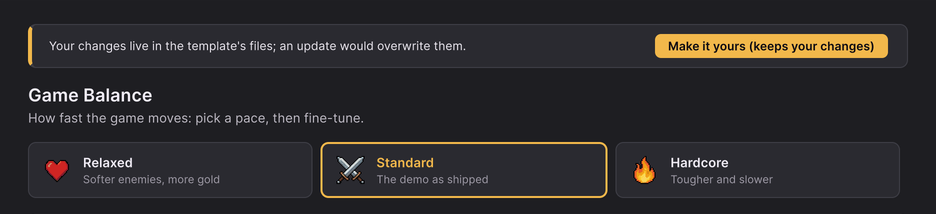
Hub > Game Balance starts with three presets: Relaxed (faster, more forgiving), Standard (the template's numbers) and Hardcore (slower, harder). Pick one, press Play, then fine-tune with the sliders.
A preset moves the starting numbers by a fixed factor of Standard:
| Number | Relaxed | Hardcore |
|---|---|---|
| Enemy health at wave 1, boss health | ×0.8 | ×1.25 |
| Boss timer | ×1.25 | ×0.85 |
| Elite chance | ×0.75 | ×1.5 |
| Gold per kill at wave 1, prestige points | ×1.25 | ×0.85 |
| Hero level-up cost at level 1 | ×0.8 | ×1.2 |
| Idle kills and Materials per hour, offline hours | ×1.5 | ×0.75 |
| Ascension opens at wave, pity | ×0.8 | ×1.2 |
It leaves the growth rates (enemy health, hero cost and damage per level, how well gold keeps up) and the **summon gem prices** alone: the early HP bands, the Ascension engine and the shop's deals are balanced against them. A starting number shifts the whole game by a fixed number of waves, which is what "kinder" or "harsher" means in an idle game. Standard puts every number back exactly as shipped.
Change a growth rate with its slider: the early HP bands follow Enemy health growth per wave on their own, and the boss walls follow Waves per boss (each moves to the nearest boss wave; going back to 10 puts them back on 90 and 100). Each slider only goes as far as your game's content allows: for example the growth rates stop where Ascension points would start to outgrow the waves. When a slider stops short of its usual range, the line under it says why in plain words. A number typed outside that range is refused under the slider with the same reason, for example "Hero damage growth per level can go up to 1.0702 with this game's content: higher, Ascension rewards would grow faster than the enemies get tougher". Advanced keeps the full range and refuses only what would really break the game.
The main numbers#
The sliders are grouped. Each has one sentence of help, a safe range measured on your content and ↺ (back to the template's number).
| Group | What it changes |
|---|---|
| Difficulty | enemy base HP and how fast it grows per wave, boss HP and timer, waves between bosses, elite chance |
| Economy | base gold, how well gold keeps up with enemy HP, hero level cost and growth, damage growth, milestone bonus |
| Idle and offline | kills and Materials per hour away, the offline cap in hours |
| Ascension | the wave that allows the first Ascension, talent points and how they grow |
| Summon | the main gate's gem prices, pity, and rarity rates (they always add up to 100 %) |
Advanced shows every other number of GameConfig, grouped as in the code, with its help text, plus read-only curve
previews (enemy HP, gold per kill, hero cost, talent points by wave).
Enemy HP grows exponentially, so a bonus of ×2 is worth a fixed number of waves: raising one number rarely breaks the game, but check the result in Play.
When features open (unlock cadence)#
Some features open on progress, never on time. In the template: the Castle at wave 60, Rankings at the first Ascension, Events at 2 Ascensions and the Growth Pass at 3. Battle, heroes, summon, missions, the calendar, the inbox and the shop are open from the start; Talents open with the first Ascension.
- Hub > Features > Advanced > When features open: the wave and/or number of Ascensions per feature (0 = no requirement; both must hold). Gates must be in the order a player meets them: Validate refuses another order.
- Open features as the player progresses off = everything open from the start.
- A locked feature stays visible: its tile is dimmed with its gate ("W60", "Asc 3") and a tap explains it. Nothing counts or pays for a locked feature; purchases are never refused.
- A feature of your own: add a row with your id in the feature set and ask the game whether it is open (see
Add your own tab). Give it the texts
unlock.<id>.nameandunlock.<id>.about.
Early pacing: HP bands and boss walls#
The first hours' shape is data on the GameConfig asset (Advanced):
| Field | What it does |
|---|---|
hpBands | waves inside a band grow enemy HP at their own rate. Bands must net out by lateGrowthFromWave, so the late game never moves |
bossWalls | extra HP on one boss wave (for example wave 100 ×3): a wall that asks for an Ascension |
bossWallDecayPerAscension | how much of a wall's extra is left after each Ascension (0.5 = ×3, then ×2, then ×1.5). 1 = the full wall every time |
prestigeCueStallMinutes | minutes of play without a new best wave after which the next-goal chip suggests Ascending. 0 = off |
Summon rates#
The summon gates are in Hub > Content > Shop (Advanced) or Content/Shop/SummonGates/: the heroes in the pool (empty
= every hero), the rarity rates, pity (a guaranteed top-rarity pull after N pulls), the ten-pull minimum rarity and
the four prices. The game's "All rates" sheet is computed from these numbers, so it is always correct.
Loot boxes are regulated in some countries: see Shop and in-app purchases.
Change numbers after release#
With Unity Remote Config (see Online services) you can change listed numbers, prices, rewards and texts for every player without a store update: players get the change at their next start. Details and the list of live keys: Adapters and backend.
Test a change#
- Press Play. Content changes show on the next Play.
- Tools > Idle RPG > Validate Content catches numbers that break a rule (a bonus past its bucket's ceiling, a price of 0).
- The developer panel adds currency and moves time forward: add the scripting define
IDLE_DEV_TOOLSand a small dev key shows at the bottom left (in the editor and in that build). Take the define out before a store build. See Adapters and backend.